
Monitoring
Consent Studio Monitoring, the standing check on your consent implementation and weekly by default, opens your pages in a real browser and reports where the setup is not doing what you built it to do: a tag firing before the visitor’s answer arrives, a vendor whose integration is switched off, a cookie nobody has described.
- Seven kinds of tracker
- Runs unasked
- Findings, not inventory
From €10 a month. No credit card, no per-visitor billing.
The first person to notice is rarely you
Something new starts running on your site most months. The question is not whether it happens, it is who finds out and how long it takes to reach you.
- The agency adds a tag and nothing needs approving
- A vendor's script starts calling a second host
- A visitor who notices closes the tab, or writes to a regulator
- So the first message you get is a formal one
Tracker monitoring, the Consent Studio way
A site comes round again as soon as its last completed scan is a week old, with nothing to schedule. Each page is opened in a real browser, and what comes back is one digest of findings that each name the page they were found on.
It comes round every week, unasked
A site is picked up again as soon as its last completed scan is a week old. Nothing is scheduled by hand and nothing has to be remembered, so the gap between something starting to run and somebody knowing about it is a week rather than however long it takes an outside party to write to you.
- Recurring
- Nothing to schedule
It sees what the page actually loaded
Each page is opened in a real browser and every resource it pulls is recorded, plus a sweep of the images, frames, scripts and stylesheets in the markup. A script you approved that starts calling a second host after an update is a change in what the page loads, which is exactly what this measures.
- Real browser
- Every subresource
Findings, and each one names its page
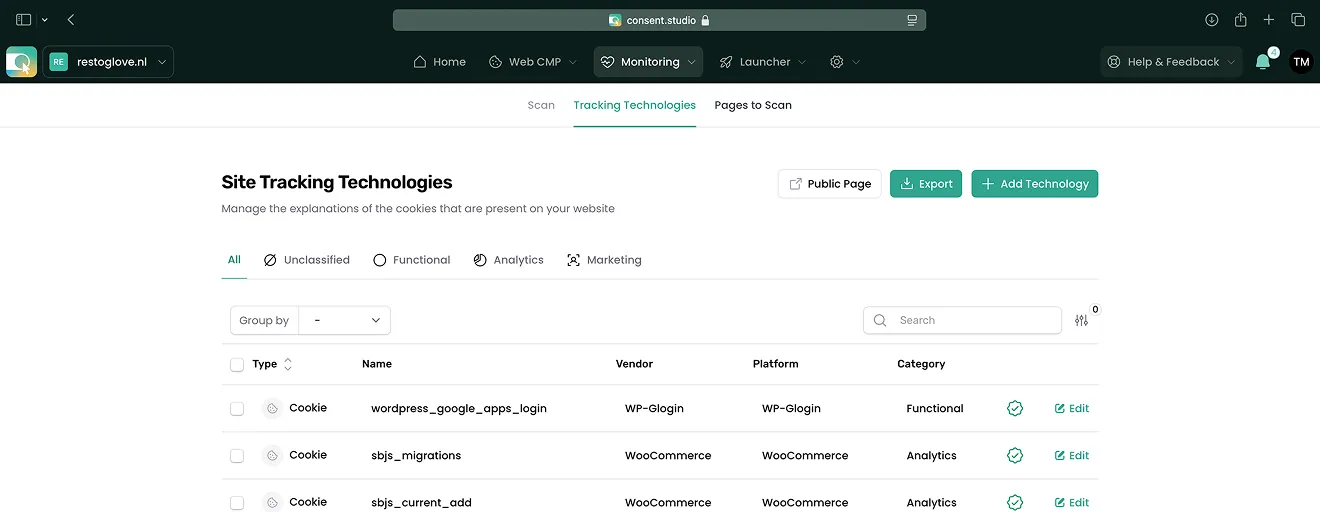
What comes back is a short list of things to decide about rather than an inventory of everything that exists, each finding naming the page that triggered it. They close themselves when the underlying problem goes away, and they arrive as one digest rather than an alert per page.
- Not an inventory
- Closes itself
- One digest
What a scan actually does
It runs without being asked, reads your pages the way a visitor does, and only tells you about things that need a decision.
It comes round on its own
A site is picked up again as soon as its last completed scan is a week old. Nothing is scheduled by hand and nothing has to be remembered, which matters because the tag that gets added without telling anyone is the whole reason this product exists.
It loads the page, it does not guess
Each page is opened in a real browser and every resource it pulls is recorded, plus a sweep of the images, frames, scripts and stylesheets in the markup. A tag that only fires after a click on a cookie banner is a tag that a static source scan never sees.
Findings close themselves when you fix them
Each finding names the page that triggered it and disappears once the underlying problem is gone, so the list is what is wrong now rather than a log of everything that ever was. What is left arrives as one digest rather than an alert per page.
Seven places a tracker can hide
Cookies are the only ones anybody checks by hand, and they are one of seven. A site can be storing an identifier in five other ways and firing beacons that store nothing at all.
Storage that survives the visit
Cookies are the familiar one. Local storage, IndexedDB and cache storage do the same job with none of the visibility, and nothing in a browser tells a site owner they are being written. All four are read on every scan and listed by name.
- Cookie
- Local storage
- IndexedDB
- Cache storage
Storage that lasts one tab
Session storage clears when the tab closes, which is exactly why it gets overlooked. It is still an identifier written to a visitor device without an answer, and a scan that stops at cookies never sees it.
- Session storage
Things that leave no trace at all
A tracking pixel stores nothing and a service worker sits between the page and the network. Neither shows up in a cookie inspector, so both are detected from what the page actually loaded rather than from what it stored.
- Tracking pixel
- Service worker
A scanner that cries wolf is worse than none
The list of things a page loads is mostly your own site. Something has to decide which of them are actually trackers, and getting that wrong has a cost that lands on you.
We got this wrong, and fixed the cause
Matching on loose keywords once declared a customer stylesheet, two font files and an application script to be tracking pixels, because their hostname happened to contain the word analytics. Hosts are now matched on label boundaries, so a rule for one domain can never reach a different one that merely reads alike.
A false positive is a credibility problem
Anything flagged here appears on your public cookie declaration and inside your banner, in a red badge. Your own fonts described to your own visitors as tracking is not a cosmetic defect, which is why the rules are one file with reasons attached rather than a carve-out per incident.
Missing one is caught somewhere else
Anything that writes a cookie, storage or a worker is caught by those detectors, and every third-party script is recorded on its own. Pixel detection only has to catch beacons that leave no other trace, so it can afford to be strict rather than eager.
How Monitoring stands out
See how Monitoring compares with a standalone cookie scanner, row by row.
| Feature | Monitoring | Standalone cookie scanners |
|---|---|---|
| What it is checked against | It reads your banner setup and names what is off. | A list of findings, with nothing to check them against. |
| What a finding tells you | AI recommendations name the error and the fix. | A finding you have to interpret yourself. |
| More than one site | Every domain in one dashboard, crawled separately. | One site at a time, one report each. |
| How it reaches you | Runs unasked, one digest, and says what to improve. | A report you have to remember to run. |
What it finds, and what it tells you
Not a list of what exists on your site. A list of what is wrong with it, each one naming the page it came from.
Consent Mode firing too late
Google Consent Mode has to initialise before any tag runs. Set too late and scripts fire without a proper answer, which costs you both the compliance position and the accuracy of the measurement you were trying to protect.
- Load order
A vendor running with its integration off
Facebook code on the page while the Meta Pixel integration is switched off in Consent Studio means the consent answer never reaches it. The same check covers Shopify, WordPress and Webflow.
- Meta
- Shopify
- WordPress
- Webflow
Two banners writing conflicting records
A Wix site showing both our banner and Wix's own has two things writing consent state to the same API, which produces records that disagree with each other. The fix is one setting, and the finding says which.
- Wix
Cookies with nothing written about them
A cookie declaration is only useful if a visitor can read what each entry does. Anything found without a description in a language you have activated is listed, so the gap is visible before somebody else finds it.
- Per language
A banner that is not there
The simplest and most expensive one. If no Consent Studio banner is found on a page that should have it, that is the first thing the scan says, rather than a clean report on a site that is not protected at all.
- Install check
When we cannot reach you, we say so
A blocked scanner, a timeout or a certificate problem is reported as exactly that. What it never does is come back with zero trackers found and let you read that as good news.
- No access
- Timeout
- SSL

Most people find out what is running on their site when somebody else tells them. We built Monitoring so that somebody is us, and so you hear it in the week it happens.

Meet our team in the wild
Taken at the Digital Analytics Summit 2026 in Amsterdam, where we were a gold sponsor.
Consent shapes what your marketing can measure, and that is easier to talk through face to face. Ask whether we can visit your company to explain how consent management and marketing fit together.
One price, and all three products in it
Every plan carries Web CMP, Launcher and Monitoring. The tier you pick changes the depth, not the toolset, and nothing is metered by pageview.
Essential
€10/month
For a single site that has to be compliant, and stay that way.
- Unlimited pages and displays
- 200,000 consent actions a month
- The full stack, not a starter tier
Professional
€36/month
For growing teams that run on data, and the agencies serving them.
Try Professional for FreeEnterprise
From €250/month
For a volume, or an obligation, a standard plan cannot answer.
Explore EnterpriseAgencies & Resellers
Buy at a partner rate and resell client sites at your own price.
Discover Partner ProgrammePublic Sector
Government, healthcare and education run on Enterprise.
See Enterprise
Trusted by organisations that take privacy seriously















Frequently asked questions about Monitoring
How often does the scan run?
A site is picked up again as soon as its last completed scan is a week old. It is not a fixed day of the week, and nothing needs to be scheduled by hand. On Professional and above you can also run one on demand.
Does it only find cookies?
No. It reports seven kinds: cookies, local storage, session storage, IndexedDB, cache storage, tracking pixels and service workers. Two of those store nothing at all, so they are detected from what the page loaded rather than from what it left behind.
Which pages of my site are scanned?
Every week we scan your home page and the pages you add. On Professional and above, we add a rotating sample of pages from your sitemap.
Will it flag my own files as trackers?
It is written hard against exactly that. Hosts are matched on label boundaries rather than as substrings, generic patterns are matched against the path only, and static assets are never pixels unless the host is a known tracker. That set of rules exists because a looser version once flagged a customer stylesheet and two font files.
What happens if the scanner cannot reach my site?
You are told which of the three it was: access blocked, a timeout, or a certificate problem. It never reports zero trackers found for a site it could not read.
Do findings pile up over time?
No. Each one closes itself when the underlying problem is gone, and each names the page that triggered it. What you are looking at is what is wrong now.
Get Started with the Full Consent Stack
Everything you need in one bundle. Consent Studio processes and stores consent data from EU visitors on infrastructure of European companies inside the EU (Scaleway, France; Bunny, Slovenia). Which tags send data afterwards, and where to, is up to you in Launcher.
Read the documentation
Our help center walks through every integration, plugin and template step by step, with screenshots. It is written and kept current by the people who build Consent Studio.