
Launcher
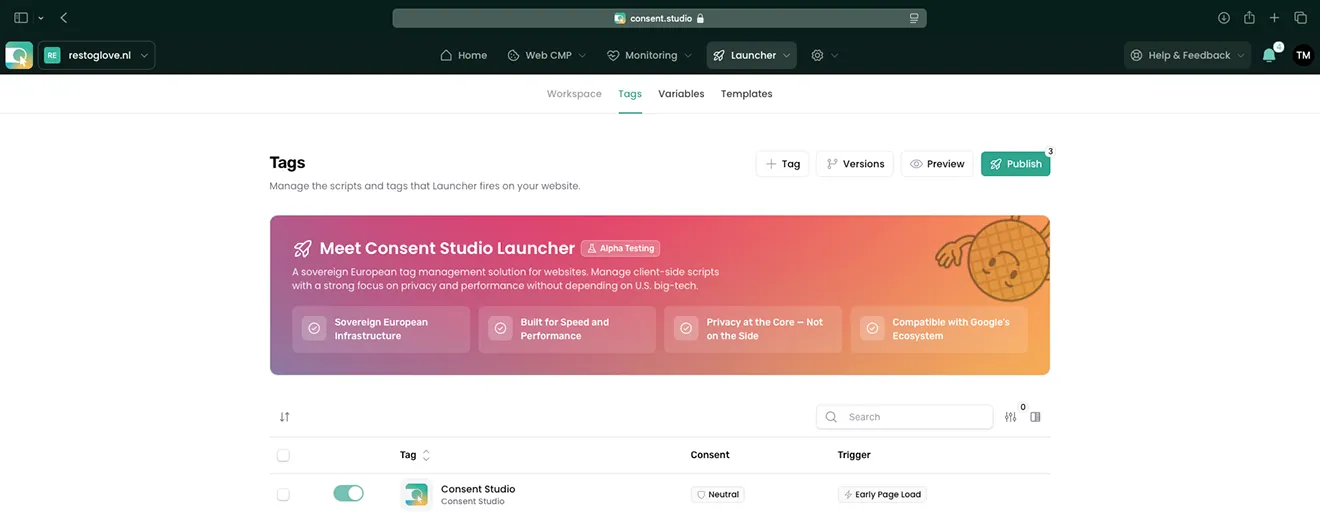
Consent Studio Launcher, the client-side tag manager with the consent banner built into it, is where every tag on your site is added, configured and published. Because both arrive in the same file, the answer a visitor gives is already there when a tag asks to run. It is in alpha testing today.
- Consent required by default
- European infrastructure
- Every publish is a version
From €10 a month. No credit card, no per-visitor billing.
Collecting consent is easy, acting on it is not
A banner collects an answer. Whether anything acts on it is a separate question, and on most sites it is decided one tag at a time by whoever added it.
- A tag fires on page load and never asks anything
- Consent gating is opt-in, so somebody must set it every time
- A tag that does check can check before the answer exists
- None of it errors, so nothing tells you
Tag management, the Consent Studio way
A new tag here is consent required by default, and the thing that asks ships in the same file, so nothing runs in a window before the answer exists. Preview is on every plan, and every publish is a version you can roll back in one click.
Consent required, by default
A newly added tag will not run until the visitor has said it may. This is the setting you have to change to get the other behaviour, rather than the one you have to remember to switch on, and it is the difference between a tag manager that can gate and one that does.
- The default
- Every new tag
The thing that asks is in the same file
The consent surface is part of the same delivered file rather than a second thing to install, so there is no window in which the banner has not loaded yet and tags are already going. A tag that does read consent is never reading it too early, because the answer exists before anything except a tag you marked early yourself.
- One file
- No early window
You can look at the order, not hope
There is a preview mode on every plan, and every publish is a version you can compare against the previous one and go back to in one click. What is running is something you can check before it is live, and check again after somebody else has changed it.
- Preview, every plan
- Every publish a version
- One-click rollback
The order things happen in
A tag manager is a promise about sequence. This is the sequence, and it is the same on every page load.
Only what you marked early runs early
A tag can be flagged to run before anything else, which is what a consent banner itself needs and what a small number of functional scripts genuinely need. It is a deliberate mark on a specific tag, not a default and not a category.
The banner initialises and asks
The consent surface comes up next, in the languages you activated and with the defaults you set for the visitor’s region. It is part of the same file rather than a second thing to install, which is why there is no window in which the banner has not loaded yet and tags are already going.
The answer is broadcast once
When the visitor decides, a single event carries that answer to everything waiting on it. There is no polling, no timer and no second source of truth: one decision, announced once, and every listener sees the same thing.
Everything else is evaluated against it
Each remaining tag is checked against the answer and its own rules, then either runs or does not. A tag you added and forgot to configure does not run, because the default for a new tag is that consent is required.
Launcher in action
Two things decide whether a tag manager is safe to hand to somebody in marketing: what each tag is allowed to do, and how quickly you can undo it.
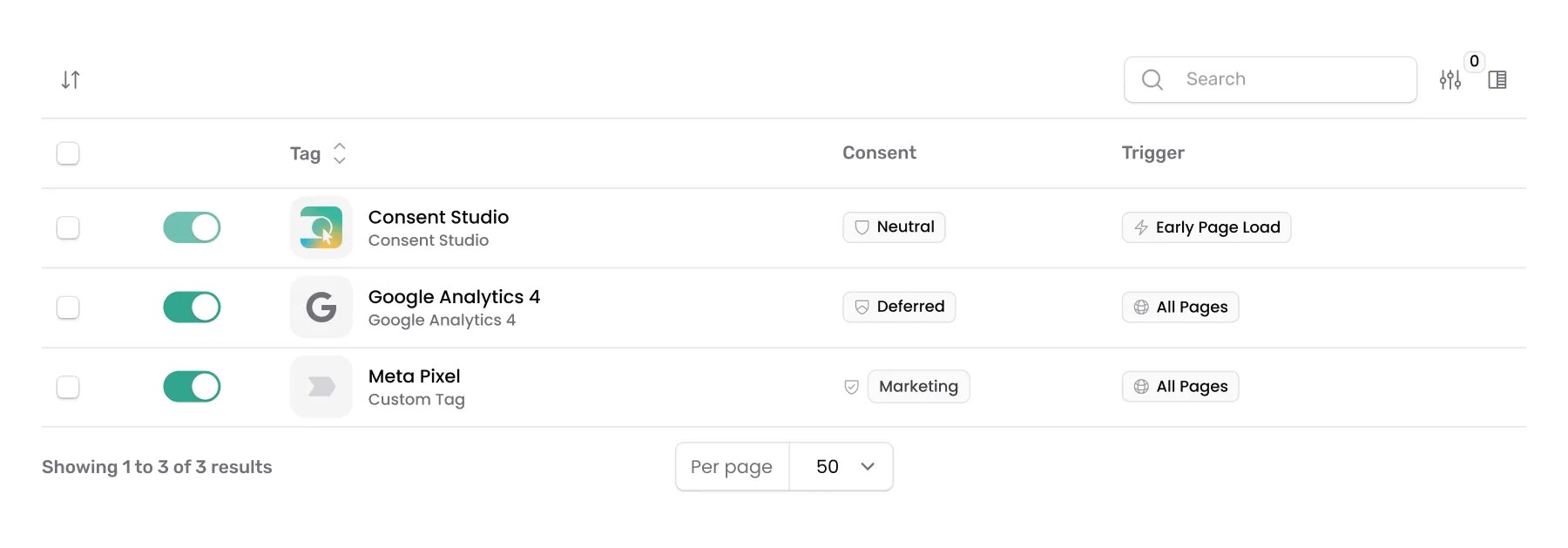
Consent and trigger on every row
A tag is not switched on and then trusted. Every row carries the consent it requires beside the trigger that fires it, so the list itself is the audit rather than something you reconstruct from settings screens.
A tag whose answer has not arrived yet is held rather than dropped. It waits for the visitor to decide and then fires, so asking first costs you nothing.

The workflow you already know
Add a tag, preview it, publish it. Every publish is a version you can read and go back to, which is what makes it reasonable to let somebody who is not a developer change what runs on your site.
The number of staged changes sits on the publish button, so what is live and what is waiting never has to be worked out from memory.
Yours to serve, and ours to keep in Europe
Where a tag manager is served from is not a detail. It is a request every visitor makes before anything else on the page.
From your own domain
On Professional and above the whole file is served first party, from a hostname you control. Nothing your visitors load in order to be asked for consent comes from somewhere else.
European infrastructure, every plan
The delivery network and everything behind it sit in Europe. That is not a tier and not an add-on, because a sovereignty claim that only applies above a certain price is not a sovereignty claim.
A rollback that is one click
Every publish is a version. You can see what changed between two of them and go back to an earlier one, which is what makes it reasonable to let somebody who is not a developer edit what runs on your site.
How Launcher stands out
See how Launcher compares with a general-purpose tag manager, row by row.
| Feature | Launcher | Traditional tag managers |
|---|---|---|
| How tags meet consent | Consent required by default, before a tag runs. | Bolted on, wired per tag. Miss one and it fires. |
| The banner itself | Web CMP in the same file. No extra request. | A second script from a second vendor. |
| Tags with their own consent API | Defer it to its own integration in Web CMP. | You wire each vendor API up yourself. |
| Triggers and conditions | Separate, per tag. Event fields can gate the fire. | One trigger, conditions baked into it. |
| Variables | Cookie, data layer, URL, consent answer, country. | A variable model that ignores consent. |
| Rules per country | Geotargeting per tag, country by country. | One container, one behaviour, every market. |
| The tag library | A curated library, European vendors included. | An open gallery you audit yourself. |
| Where it is served from | European on every plan. Your hostname from Professional. | Somebody else's global network. |

I wanted to make tag management intelligent: geo-aware, consent-aware, event-aware, and none of it extra work for whoever manages the site.
Triggers, variables, and what fires when
The parts you assemble a tag out of, and the three ways of saying when it is allowed to go.
Tags that carry a consent API of their own
Some vendors ship their own consent mechanism rather than expecting to be blocked: Meta Pixel and Google Consent Mode are the two most sites already run. Defer hands the decision to that mechanism instead of holding the tag back, and the answer reaches it through the matching integration in Web CMP. One setting in the banner drives both halves.
- Defer
- Meta Pixel
- Consent Mode
Three ways to decide, nine ways to fire
Neutral leaves a tag to run on its own terms, Defer hands the decision to a mechanism already on the page, and Conditions lets you write the rule yourself across categories. Then the trigger: immediately, on page load, when the DOM is ready, on a data layer event, on a click, on a form submit, after a timer, at a scroll depth, or when an element becomes visible.
- Neutral
- Defer
- Conditions
- Nine triggers
Five places to read a value, and one per country
A variable comes from a cookie, a data layer key, a JavaScript variable, a URL parameter or your own snippet, and it is resolved when the tag runs rather than when it was written. A tag can also carry a complete per-country replacement, so a market with its own vendor does not need a duplicate tag with a condition wrapped around it.
- Cookie
- Data layer
- URL
- Per country

One answer controls every tool on your site
Ready-made templates covering the analytics, advertising and support tools most sites are already running, plus your own HTML or a script URL for anything not on the list.
Discover All Integrations






Agencies run this across dozens of client sites, so a change that saves ten minutes on one site saves a day across a portfolio. That arithmetic decides what we build next, more than any roadmap does.

Meet our team in the wild
Taken at the Digital Analytics Summit 2026 in Amsterdam, where we were a gold sponsor.
Consent shapes what your marketing can measure, and that is easier to talk through face to face. Ask whether we can visit your company to explain how consent management and marketing fit together.
One price, and all three products in it
Every plan carries Web CMP, Launcher and Monitoring. The tier you pick changes the depth, not the toolset, and nothing is metered by pageview.
Essential
€10/month
For a single site that has to be compliant, and stay that way.
- Unlimited pages and displays
- 200,000 consent actions a month
- The full stack, not a starter tier
Professional
€36/month
For growing teams that run on data, and the agencies serving them.
Try Professional for FreeEnterprise
From €250/month
For a volume, or an obligation, a standard plan cannot answer.
Explore EnterpriseAgencies & Resellers
Buy at a partner rate and resell client sites at your own price.
Discover Partner ProgrammePublic Sector
Government, healthcare and education run on Enterprise.
See Enterprise
Trusted by organisations that take privacy seriously















Frequently asked questions about Launcher
What does alpha testing mean for me?
Launcher is live, included in every plan and supported, and it is marked as alpha testing in the dashboard because it is still moving quickly. Expect capabilities to be added and interfaces to change. If you need something that will not move underneath you this quarter, that is worth knowing before you build on it.
How is this different from Google Tag Manager?
Two things. A tag you add here requires consent by default, where a container elsewhere fires unless something stops it. And the consent banner is part of the same file, so there is no window in which the banner has not loaded and tags are already running.
Will my tags work under a Content Security Policy?
Yes. Your tag code is compiled into the file that is served rather than injected as an inline script at runtime, which is the pattern a strict policy blocks. Nothing has to be added to your policy for a tag to be allowed to run.
Can I use my own scripts, not just templates?
Yes. The library covers the tools most sites are already running, and beside it there is a custom HTML tag and a custom script URL for anything that does not have a template. Both are gated by consent on exactly the same terms as a template.
Can I try a change before it goes live?
Yes. There is a preview mode on every plan, and every publish is a version you can compare against the previous one and roll back to.
Do I still need the consent banner separately?
No. Web CMP is part of the same delivered file. That is the point of the ordering: the thing that asks and the thing that enforces are not two installs that have to agree with each other.
Get Started with the Full Consent Stack
Everything you need in one bundle. Consent Studio processes and stores consent data from EU visitors on infrastructure of European companies inside the EU (Scaleway, France; Bunny, Slovenia). Which tags send data afterwards, and where to, is up to you in Launcher.
Read the documentation
Our help center walks through every integration, plugin and template step by step, with screenshots. It is written and kept current by the people who build Consent Studio.